
Photorealistic vs Sketch Style: Choosing the Right AI Output for Your Stage
When to generate photorealistic renders vs architectural sketches — and how to prompt for each depending on where you are in the design process.
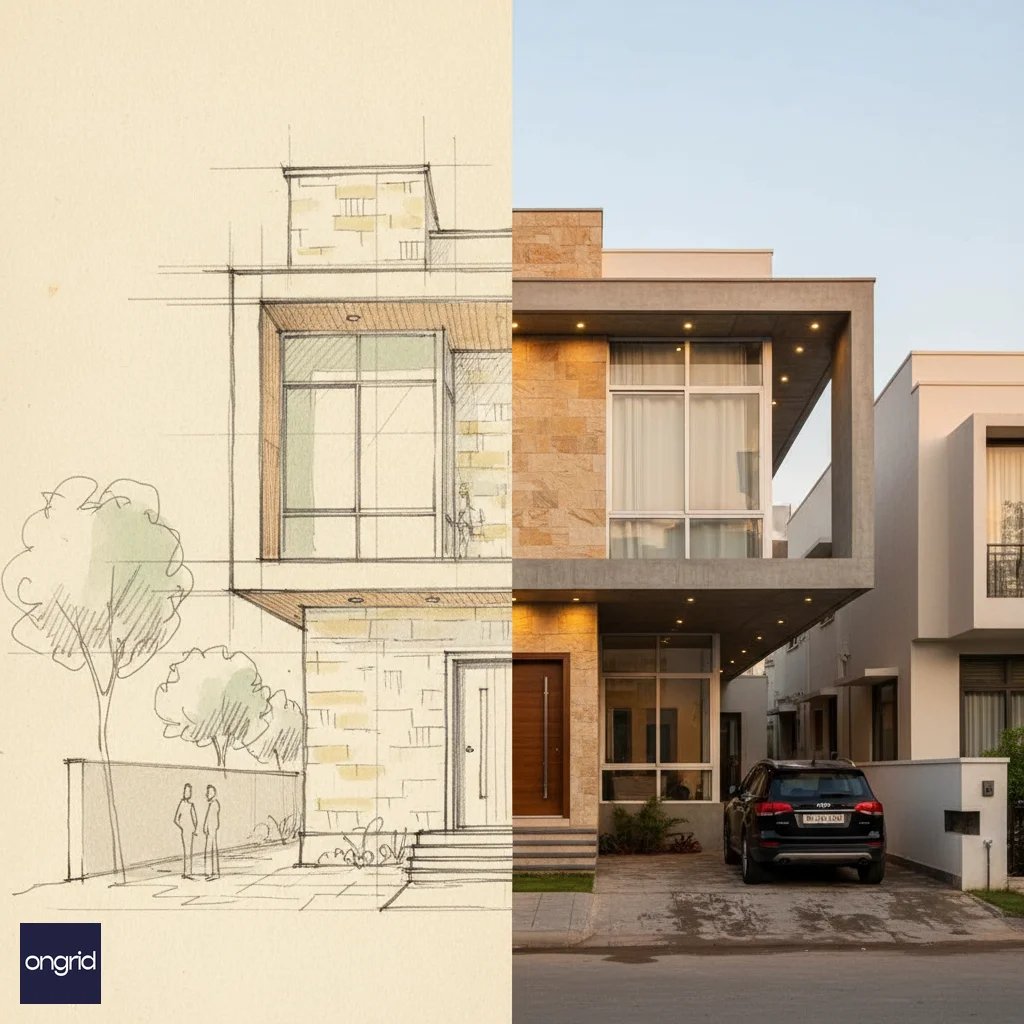
Every week I sit across the dining table from a homeowner in Bengaluru or Pune who has just been shown a gorgeous render of “their” house and is ready to sign off on a design they haven’t really understood. The render is beautiful. The design is half-baked. This is what the photorealistic vs sketch elevation AI decision is meant to resolve — not which output looks better in a WhatsApp forward, but which matches the stage of decision you are actually at. Elevations by Ongrid Design gives you both; knowing when to ask for what will save you weeks of rework, lakhs in surprises, and at least one family argument. If you are new to this territory, our complete beginner’s guide to how AI elevation design works is the best place to build the foundational vocabulary before going deeper here.
Quick Answers
When should I use a sketch-style output? In the first two to three weeks of concept design, whenever the conversation is about massing, openings, proportion, or family buy-in. Sketches hide finishes that have not been costed yet.
When should I use a photorealistic render? Once the plan is frozen and you are ready to lock materials, commission contractor quotes, seek loan valuation, or list a spec house on 99acres or MagicBricks.
Which is better for the architect brief? Sketch, every time. An ai architectural sketch invites feedback on shape; a render invites feedback on shade. In the brief phase you want the first.
Which impresses the builder more? Photorealism, every time. Contractors, fabricators, and painters quote against what they can see — a photorealistic house render ai output closes the gap between intent and estimate.
Photorealistic vs Sketch Elevation AI at a Glance

A sketch-style output is a line-dominant, tonal drawing — soft shadows, visible hatching, sometimes a light watercolour wash. It shows massing, rhythm, proportion and the hierarchy between solid and void. You see that there is a jaali screen; you don’t see which jaali screen.
A photorealistic output is the opposite promise: every Kajaria tile grout line, every Alstone ACP panel joint, the warm-white throw of the soffit LEDs, the glint on polished Jaisalmer stone at the porch. It tells the viewer this is what the house will look like at 7
PM on a clear February evening in Hyderabad.Both can be generated from the same elevation drawing in Elevations by Ongrid Design. The mistake homeowners make is treating photorealism as “the better version” of a sketch. It isn’t — a sketch is a different instrument for a different decision.
| Attribute | Sketch Style | Photorealistic |
|---|---|---|
| What it communicates | Massing, proportion, rhythm | Finish, material, light, mood |
| Cognitive load on viewer | Low — reads quickly | High — viewer scans for flaws |
| Encourages feedback on | Form, openings, overall shape | Colour, texture, brand of material |
| Time to generate per option | Faster, allows 6-10 variants | Slower, typically 2-3 variants |
| Cost anchor for decision | Per sq ft shell cost (₹1,650-2,200) | Finish package (₹450-900 per sq ft) |
| Risk if shown too early | Almost none | Premature lock-in, scope creep |
| Risk if shown too late | Decisions get walked back | Builder quotes land blind |
If you remember nothing else from this guide: sketches are for decisions about shape, photorealistic renders are for decisions about stuff.
When A Sketch Beats A Render — The Early-Concept Advantage

There is a reason senior architects in Ahmedabad and Jaipur still reach for a roller pen and butter paper even in 2026. The loose drawing invites participation. A homeowner looking at a sketch will tell you the porch feels narrow, the first floor looks heavy, the staircase grill is too busy. A homeowner looking at a photoreal render of the same elevation will tell you they don’t like the shade of beige.
You want the first feedback. You do not want the second feedback yet.
This is where ai architectural sketch outputs earn their keep. In the first two weeks — when you are still negotiating with your spouse about the pooja room window and with your father-in-law about whether the parapet should be solid or railing — a sketch keeps the conversation honest. It does not pretend to know the final Asian Paints Ultima shade, so nobody gets attached to a colour that may not survive a south-facing wall in Chennai. Once the sketch starts attracting pointed feedback, our guide on how to iterate on AI elevation designs from first draft to final vision walks through the revision loops that actually converge on a buildable facade.
Three situations where I recommend staying in sketch mode:
- Architect brief and first client walkthrough. Presenting 3-4 massing options for a 30x50 plot in BBMP limits, photorealism forces commitment to materials you haven’t costed. A sketch keeps all four options on equal footing.
- Family buy-in meetings. Elders read sketches the way they read newspapers — for the information, not the styling. You get better structural feedback and fewer “why is it this colour” detours.
- Pre-sanction conversations with the BBMP, PMC, MCGM, or DDA liaison in Delhi. Sanction drawings live in the line-drawing register, and a sketch-style elevation bridges the sanction set and the client presentation.
A sketch also photocopies and prints on a site board without losing anything. A render loses 60% of its information the moment it hits a cloudy PDF.
When Photorealism Wins — Builder Buy-In, Approvals, And Marketing

Now flip the table. You are eight weeks in, the plan is frozen, the structural drawings are with the RCC consultant, and you are about to take quotes from three contractors in Pune for the finishing package. This is where a photorealistic house render ai output stops being a vanity item and becomes a commercial document.
Contractors quote against what they see. Show a Mumbai contractor a sketch with a “stone cladding feature wall” and he quotes for Kota. Show him a photoreal render with the exact Jaisalmer-yellow limestone coursing pattern, band height, and pointing style, and he quotes for Jaisalmer — typically a ₹150-220 per sq ft delta, on the table from day one rather than month three. If you want the render to carry truly specific finish intent, our piece on AI elevation with specific materials covers how to prompt brand, coursing, and texture precisely.
The same logic applies to six other stakeholders:
| Stakeholder | Why photorealism wins | Typical ₹ impact of getting it right |
|---|---|---|
| Main contractor | Quotes against visible finish, not imagination | In our experience, saves 8-12% on finish variations |
| Fabricator (railings, grills, gates) | Can match profile and powder-coat shade | Saves one full rework cycle (~₹40,000-₹1.2 lakh) |
| Painter | Commits to Berger Silk vs Asian Paints Ultima pre-order | Typically avoids 15-20 litres of wastage on a standard 3BHK |
| Bank valuer / loan officer | Valuation report matches visible intent | Smoother disbursal for ₹45 lakh-₹2.5 crore home loans |
| Interior designer | Coordinates ceiling and soffit with exterior mood | Prevents the “my exterior is warm, my interior is cool” mismatch |
| Prospective buyer / tenant | Emotional commitment, higher ask price | In our experience, a 3-6% premium on listing for spec houses |
Photorealism is also the correct register for marketing. A small builder in Hyderabad or Kolkata listing a 4-unit row-house project on 99acres or MagicBricks needs every Kajaria tile and Aludecor panel visible in the first thumbnail. A sketch listing underperforms a render listing on click-through by a margin you cannot afford.
The one place I push back on photorealism is loan paperwork that requires stamped sanction drawings. The render supplements the sanction set; it does not replace it.
How To Prompt Each Style — Copy-Paste Templates

Output quality is almost entirely a function of the prompt. Elevations by Ongrid Design responds very differently to “render this elevation” (vague — you get a mid-photoreal default) versus a prompt that names the register, the medium, and the intent.
Sketch Template
Pencil-and-wash elevation sketch of a [PLOT_SIZE] residence,
[VIEW] from the [DIRECTION] road, eye level [HEIGHT],
[TIME_OF_DAY] shadow, suppress material detail, no colour callouts,
[PAPER_TEXTURE], for [STAGE] review.
Photorealistic Template
Photoreal [TIME_OF_DAY] render of a [PLOT_SIZE] [STYLE] residence
on a [CITY] street, [LIGHTING_NOTE], [CLADDING] on [LOCATION],
[STONE_SPEC] on [LOCATION], [PAINT_BRAND_SHADE] on plastered surfaces,
[TILE_SPEC] at porch, [DOOR_MATERIAL] main door, [VIEW], [CAMERA_SPEC].
Sub-Case Snippets
- Jaali detail:
Ink-line detail of a [PATTERN] jaali screen, [DIMENSIONS] module, mounted on [LOCATION], scale 1:20, for fabricator reference. - Night shot:
Photoreal night elevation at 8:15 PM, warm 3000K facade wash, 4000K driveway bollards, [CITY] street, three-quarter view, 35 mm. - Monsoon context:
Photoreal overcast monsoon elevation, wet driveway reflection, low-contrast sky, [CITY] setting — to stress-test dark facade readings. - Facade grill:
Sketch detail of [PATTERN] MS grill with [SECTION] section, [POWDER_COAT_SHADE] finish, axonometric, scale 1:10, for powder-coater quotation.
Two mistakes to avoid: do not mix registers in one prompt (“sketchy but photoreal” produces muddy output), and do not ask for more than one primary view per generation — give each view its own prompt.
Stage-By-Stage Recommendation — Concept To Handover

Here is the sequencing I actually use on residential projects, whether it is an ₹85 lakh renovation in Jaipur or a ₹4.2 crore new-build in Mumbai.
| Stage | Duration | Primary output | Secondary output | Decision it supports |
|---|---|---|---|---|
| Concept | Week 1-2 | Sketch (3-4 options) | None | Massing, openings, approach |
| Design development | Week 3-5 | Sketch with call-outs | 1 photoreal “direction-setter” | Proportion, window-to-wall, parapet |
| Finish selection | Week 6-8 | Photoreal (3 variants) | Sketch for jaali/grill details | Material palette, brand commitment |
| Pre-construction quote | Week 9-10 | Photoreal (locked) | Sketch for fabrication details | Contractor quotes, BOQ finalisation |
| Mid-construction | Month 4-7 | Photoreal (zoned) | Sketch for site-level sign-off | Colour corrections, finish tweaks |
| Handover & marketing | Month 9-12 | Photoreal (hero shots) | Sketch for brochure line-art | Valuation, listing, social proof |
The most common mistake: homeowners ask for photoreal renders in week 1 because a render looks impressive and a sketch looks unfinished. The family picks a colour, and nine weeks later, when the Johnson tiles they loved are unavailable, the whole mood has to be re-chosen. Had the week-1 output been a sketch, the colour conversation would have started in week 6 where it belongs.
Combining Both In One Project — The Hybrid Workflow

The most mature workflow I have seen — and the one Elevations by Ongrid Design is built around — is not “sketch then render” but sketch AND render, in rotation, right through handover.
A hybrid deck looks like this: a locked photoreal hero view on the cover, with sketch-style detail call-outs on the interior pages showing the jaali pattern, the grill motif, the coping profile, the MS railing detail. The photoreal view sells the project; the sketches resolve the details photorealism would over-promise. A contractor in Chennai knows exactly what to quote from the photoreal image and exactly what to fabricate from the sketch detail. When it is time to take that deck to the architect, our walkthrough on turning AI outputs into an actionable architect brief shows exactly which sheets to package and how to annotate them.
Three habits that make the hybrid workflow work:
- Version renders against the locked plan. If the plan changes, the render is stale. The sketch is often still valid because it is about form, not finish.
- Keep one sketch live even at handover. The walkthrough is smoother when the homeowner can see the line drawing of what they signed off on.
- Archive both. Five years on, when the owner wants to sell or refinance a ₹1.8 crore house in Delhi or Gurugram, the render sells it and the sketch proves the bones.
Your plot, your stage — a sketch for this week’s family meeting, a photoreal view for next month’s contractor walkthrough. Let each output do the job it is good at. Generate your own elevation →
You do not choose one register over the other — you choose the right one for the decision in front of you. Open your sanctioned plan in Elevations by Ongrid Design, generate your own elevation — a sketch for this week’s family meeting and a photoreal view for next month’s contractor walkthrough — and let each output do the job it is good at. That is the difference between a home that gets built once, correctly, and a home that gets built twice.
Generate your own elevation
Generate your own elevation →Keep reading
 Guide
Guide How AI Elevation Design Works: A Complete Beginner's Guide
Learn how AI generates photorealistic house elevation designs from text prompts — and how to use it for your dream home.

AI Elevation with Specific Materials: Prompting for Stone, Glass, Wood & More
How to tell AI exactly which facade materials you want — with prompt examples for natural stone, glass curtain walls, wood cladding, and HPL.

Modern vs Traditional: How to Prompt AI for Each Elevation Style
Side-by-side prompt comparison for modern minimalist, traditional Indian, and contemporary fusion elevations using AI tools.